

The Sidebar is the primary navigation element in Seed. It provides a persistent, context-aware interface for accessing core app functionality, user accounts, and favorite sites. Designed for clarity and speed, the Sidebar enables users to move seamlessly between creation, navigation, and collaboration.
Layout
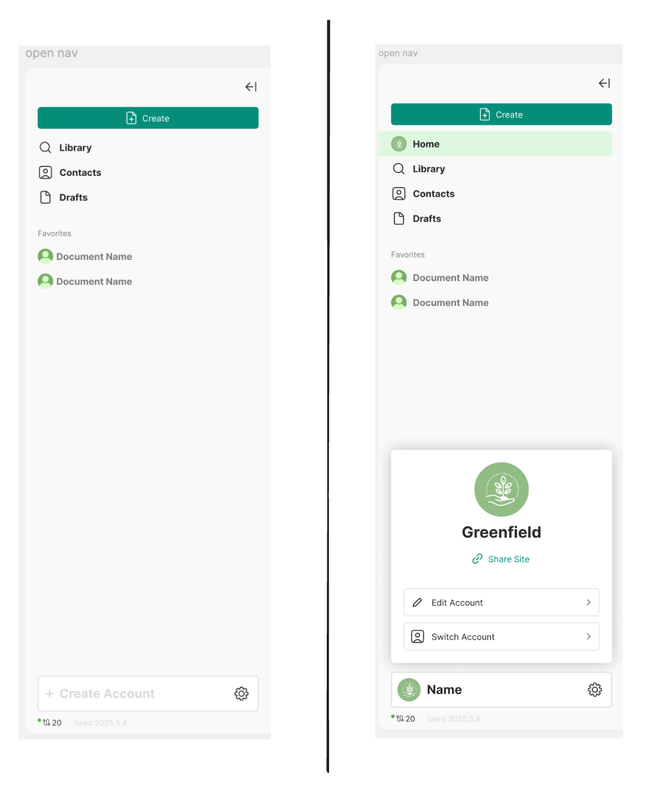
The Sidebar is vertically divided into the following regions:
Primary Action
Create Document
A prominent button at the top, always visible. Use bold colors and accessible text contrast. It opens a new document under the active Site.
Navigation Shortcuts
Library, Contacts, and Drafts
Icon + label entries for structured access to personal content. These entries are static and should never change position.
Favorites
A short, user-curated list of most-used Sites or contacts.
Supports drag-and-drop reordering. Clicking navigates directly to the root of that Site.
Accounts
Represents all Sites the user has created.
Each entry includes:
Avatar (with fallback initials)
Site name (ellipsis if truncated)
Optional verification indicator or active-state dot
Clicking a Site activates its context and loads its content.
A + icon lets users join or create new Sites.
The Account should be collapsable and the app must remind the state until the user decides to expand it.
Status Footer
Includes:
Sync Status icon (connected/disconnected)
Local instance info (e.g. Seed 0.0.0.local)
Build version
⚙️ for settings/preferences
Latest Designs
Do you like what you are reading? Subscribe to receive updates.
Unsubscribe anytime